

目录
问题描述
问题截图
原因猜测
解决方案
Android Studio启动虚拟机时一直出现Install Haxm,但是按照他的安装步骤后还是不停的弹出提示安装Haxm
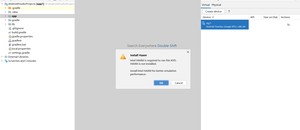
为什么会出现这种情况那?我猜测应该是权限问题,也就是说win11/win10应该是需要手动或者管理员模式才能去安装什么东西
1 打开File-》Setings-》点击

2 找到Android SDK 然后复制看到的路径,并打开资源管理器,将刚刚复制的路径,粘上

3 然后找到以下目录,看图,我的具体目录是:
 4 找到haxm...exe点击安装即可
5 安装完成后回到Android Studio发现已经没有了提示安装Haxm,然后我们点击启动(第一次要等个3分钟左右)发现虚拟机可以正常启动了!
-----------------------------------------------------------------------------------------------------------------------------------------------------------------------------------------------------------------------------------------------------------------------------------------------------------------------------------------------------------------------------------------------------------------------------------------------------------------------------------------------------------------------------------
<?xml version="1.0" encoding="utf-8"?>
<manifest xmlns:android="http://schemas.android.com/apk/res/android"
xmlns:tools="http://schemas.android.com/tools"><application
android:allowBackup="true"
android:dataExtractionRules="@xml/data_extraction_rules"
android:fullBackupContent="@xml/backup_rules"
android:icon="@mipmap/ic_launcher"
android:label="@string/app_name"
android:roundIcon="@mipmap/ic_launcher_round"
android:supportsRtl="true"
android:theme="@style/Theme.MyApplication"
tools:targetApi="31">
<activity
android:name=".MainActivity"
android:exported="true"
android:label="@string/app_name"
android:theme="@style/Theme.MyApplication.NoActionBar">
<intent-filter>
<action android:name="android.intent.action.MAIN" /><meta-data
android:name="android.app.lib_name"
android:value="" />
</activity>
</application></manifest>
版权声明:
本文来源网络,所有图片文章版权属于原作者,如有侵权,联系删除。
本文网址:https://www.mushiming.com/mjsbk/2034.html