


linux命令lspci
Linux provides command in order to list PCI bus and devices information. This command will provide brief or detailed information about currently connected PCI devices like GPU, USB Card etc.
Linux提供命令以列出PCI总线和设备信息。 该命令将提供有关当前连接的PCI设备(如GPU,USB卡等)的简要或详细信息。
We can install tool with the following command to the based distributions.
我们可以使用以下命令将工具安装到基于的发行版中。

In or based distributions we can use the following command which will install the package named .
在基于或的发行版中,我们可以使用以下命令来安装名为的软件包。

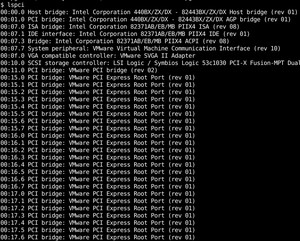
We will start with the simplest form where we will do not provide any option to this command. This will print PCI Address or slot information with the device type and vendor information.
我们将从最简单的形式开始,在该形式中,我们将不为该命令提供任何选项。 这将打印PCI地址或插槽信息以及设备类型和供应商信息。
Most of the computers have a few PCI interfaces. This may list a lot of information which will jam the output. Or we may be interested in the specific PCI slot of address. In this example, we will print information about PCI slot number which is SCSI device controller.
大多数计算机都有一些PCI接口。 这可能会列出很多会阻塞输出的信息。 或者我们可能对地址的特定PCI插槽感兴趣。 在此示例中,我们将打印有关PCI插槽号即SCSI设备控制器)的信息。

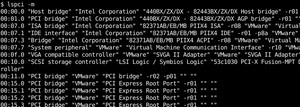
The default printing format is human-readable format. This means PCI address or slot, vendor and product information is printed in a space delimited format. Machine-readable format is a double quote separated format which can be parsed easily.
默认的打印格式是人类可读的格式。 这意味着PCI地址或插槽,供应商和产品信息以空格分隔的格式打印。 机器可读格式是一种双引号分隔的格式,可以轻松解析。
PCI bus provides a lot of information about the PCI connection and the devices. By default, this information is not printed completely. We can print detailed information about this PCI connection and device with the verbose option like below.
PCI总线提供了大量有关PCI连接和设备的信息。 默认情况下,此信息未完全打印。 我们可以使用下面的详细选项打印有关此PCI连接和设备的详细信息。
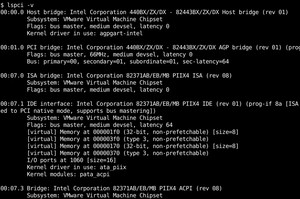
We can see that for every PCI device information like Subsystem, Flag, Memory Location or Address, Kernel Driver In Use, Kernel Modules, I/O ports etc.
我们可以看到每个PCI设备的信息,例如子系统,标志,内存位置或地址,正在使用的内核驱动程序,内核模块,I / O端口等。
We can also print PCI Slot and Devices information in tag:value format. This will make the information readable like JSON format. We will use option like below.
我们还可以使用tag:value格式打印PCI插槽和设备信息。 这将使信息像JSON格式一样可读。 我们将使用选项,如下所示。
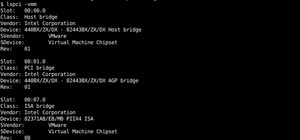
Every computer hardware manufacturer has its own vendor and device code or ID. We can print device vendor, class, svendor,sdevice ID with the option like below.
每个计算机硬件制造商都有自己的供应商和设备代码或ID。 我们可以使用选项打印设备供应商,类,供应商,sdevice ID,如下所示。
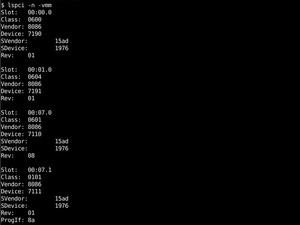
As very PCI device have its kernel module and driver to be used by the Linux operating system. We can list all kernel and drivers with the option like below.
由于PCI设备具有其内核模块和驱动程序供Linux操作系统使用。 我们可以使用选项列出所有内核和驱动程序,如下所示。
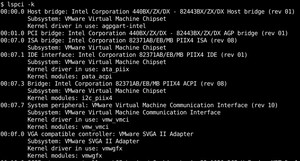
We can see that the following information is provided by .
我们可以看到提供了以下信息。
- Device Name 设备名称
- Subsystem子系统
- Kernel driver内核驱动
- Kernel module内核模块
Up to now, we have listed PCI Devices in a line by line or regular format. We can also list the output of the in a tree format with a hierarchical manner. We will use option like below.
到目前为止,我们已经按行或常规格式列出了PCI设备。 我们还可以通过树的方式以分层方式列出的输出。 我们将使用选项,如下所示。
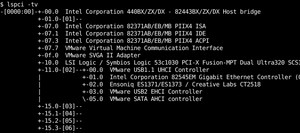
We can see that some devices are listed under VMware USB controller.
我们可以看到某些设备在VMware USB控制器下列出。
We have already printed detailed or verbose information about the PCI slots. We will use multiple option or . More means more verbose or detail.
我们已经打印了有关PCI插槽的详细信息。 我们将使用多个选项或 。 越大,意味着越详细或细节。
翻译自: https://www.poftut.com/linux-lspci-command-tutorial-with-examples/
linux命令lspci
版权声明:
本文来源网络,所有图片文章版权属于原作者,如有侵权,联系删除。
本文网址:https://www.mushiming.com/mjsbk/10291.html