

导读
如何在Linux环境中加密shell脚本?shell脚本包含密码,不希望其他具有执行权限的人查看shell脚本并获取密码。可以安装使用shc工具,普通用户无法读取shc创建的加密Shell脚本。SHC是指:Shell脚本编译器(Shell Script Compiler)。
环境
Centos8
安装shc
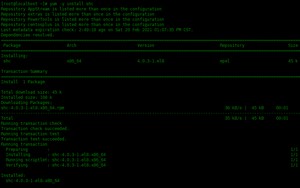
[root@localhost ~]# yum -y install shc
创建一个shell脚本
下面创建一个脚本文件:
[root@localhost ~]# vim welcome.sh #!/bin/sh echo "Welcome to linux world"
使用shc加密该脚本文件
如下所示,使用shc加密welcome.sh脚本。
[root@localhost scripts]# shc -v -f welcome.sh shc shll=sh shc [-i]=-c shc [-x]=exec '%s' "$@" shc [-l]= shc opts= shc: cc welcome.sh.x.c -o welcome.sh.x shc: strip welcome.sh.x shc: chmod ug=rwx,o=rx welcome.sh.x

- welcome.sh 是原始的未加密shell脚本
- welcome.sh.x 是二进制格式的加密shell脚本
- welcome.sh.x.c 是welcome.sh文件的C源代码。编译该C源代码以创建上面的加密的welcome.sh.x文件。
可以使用命令查看文件的类型:
[root@localhost scripts]# file welcome.sh welcome.sh: POSIX shell script, ASCII text executable [root@localhost scripts]# file welcome.sh.x welcome.sh.x: ELF 64-bit LSB executable, x86-64, version 1 (SYSV), dynamically linked, interpreter /lib64/ld-linux-x86-64.so.2, for GNU/Linux 3.2.0, BuildID[sha1]=35e0e2569eca90774e379d6fef51ad6fedf346f5, stripped [root@localhost scripts]# file welcome.sh.x.c welcome.sh.x.c: C source, ASCII text [root@localhost scripts]#

执行加密后的shell脚本
现在,让我们执行加密的Shell脚本,确保能够运行:
[root@localhost scripts]# https://www.linuxprobe.com/welcome.sh.x Welcome to linux world

指定Shell脚本的过期时间
使用shc,您还可以指定到期日期。即在这个到期日期之后,当有人尝试执行Shell脚本时,将收到错误消息。使用选项创建一个新的加密Shell脚本,指定到期日期。到期日期以dd/mm/yyyy 格式指定。
# 删除之前创建的.x , .x.c文件 [root@localhost scripts]# rm -rf welcome.sh.x* # 创建带有过期时间的加密脚本 [root@localhost scripts]# shc -e 01/02/2021 -v -f welcome.sh shc shll=sh shc [-i]=-c shc [-x]=exec '%s' "$@" shc [-l]= shc opts= shc: cc welcome.sh.x.c -o welcome.sh.x shc: strip welcome.sh.x shc: chmod ug=rwx,o=rx welcome.sh.x
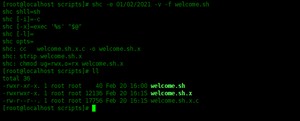
在此示例中,如果有人尝试执行welcome.sh.x脚本文件,会提示已过期。
[root@localhost scripts]# https://www.linuxprobe.com/welcome.sh.x https://www.linuxprobe.com/welcome.sh.x: has expired! Please contact your provider

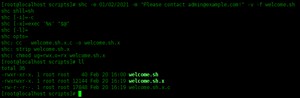
如果要指定自定义到期消息,需要加入选项。
[root@localhost scripts]# shc -e 01/02/2021 -m "Please contact !" -v -f welcome.sh shc shll=sh shc [-i]=-c shc [-x]=exec '%s' "$@" shc [-l]= shc opts= shc: cc welcome.sh.x.c -o welcome.sh.x shc: strip welcome.sh.x shc: chmod ug=rwx,o=rx welcome.sh.x
总结
本文介绍了如何使用shc加密shell脚本。
本文原创地址:https://www.linuxprobe.com/shc-encrypt-shell.html编辑:逄增宝,审核员:逄增宝
版权声明:
本文来源网络,所有图片文章版权属于原作者,如有侵权,联系删除。
本文网址:https://www.mushiming.com/mjsbk/13094.html